k
Free AI Bulk Image Compressor – Reduce Image Size Without Losing Quality
What Is AI Bulk Image Compressor?
The AI Bulk Image Compressor is a powerful online tool that helps you reduce the file size of multiple images at once using artificial intelligence. It’s designed to keep your images sharp and clear while significantly lowering their size, making them ideal for faster web performance, quicker sharing, and efficient storage management.
This tool automatically analyzes the content of each image and applies smart compression techniques that strike the perfect balance between quality and size. You can upload JPEG, WebP, or AVIF images, customize output settings like quality level and dimensions, and let the AI do the rest right in your browser. There's no need to install software or create an account.
How to Use This Bulk Image Compressor Tool?
Using the AI Bulk Image Compressor is quick, simple, and completely hassle free. Whether you're compressing a single image or dozens at once, the tool guides you through an intuitive process right from uploading your files to downloading the optimized versions. Follow the step by step outline below to get the best results with minimal effort, all within your browser.
Step 1: Upload Your Images
To get started, simply upload the images you want to compress. You can do this in two ways:
- Drag and drop your images directly into the upload area, or
- Click the “Browse Files” button to select them manually from your device.
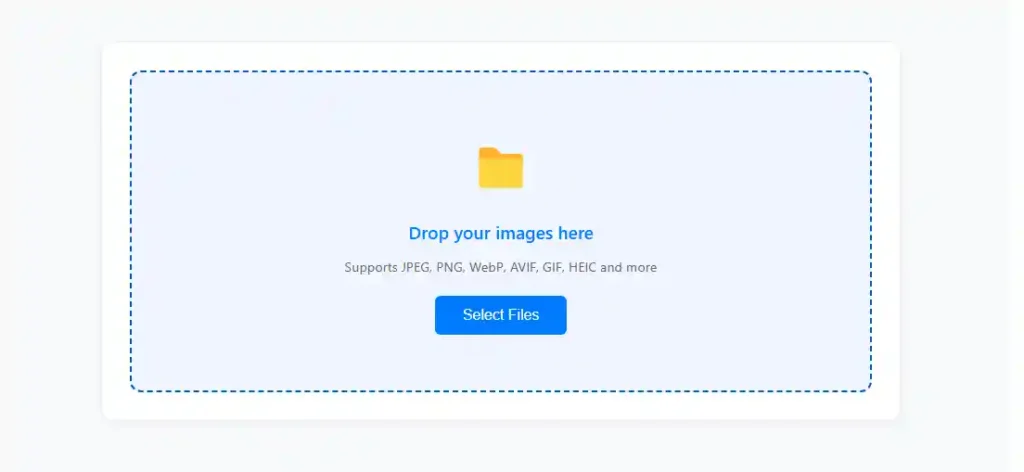
The tool supports multiple formats such as JPG, WebP, and AVIF etc, and you can upload multiple images at once for bulk compression. As soon as your images are uploaded, you’ll see small thumbnails displaying the file name, size, and dimensions. This helps confirm that your files are ready for processing.
Once the images are successfully loaded, the page will automatically scroll down to the next section, where you can customize your compression settings. There’s no need for any external software or account everything runs right in your browser for speed and privacy.
Step 2: Customize Compression Settings
After uploading your files, move to the compression settings section where you can take full control of how your images are optimized using the AI Bulk Image Compressor. This step is crucial to reduce image size without losing quality and to achieve the perfect balance for your needs—whether you're compressing images for websites, emails, or printing.
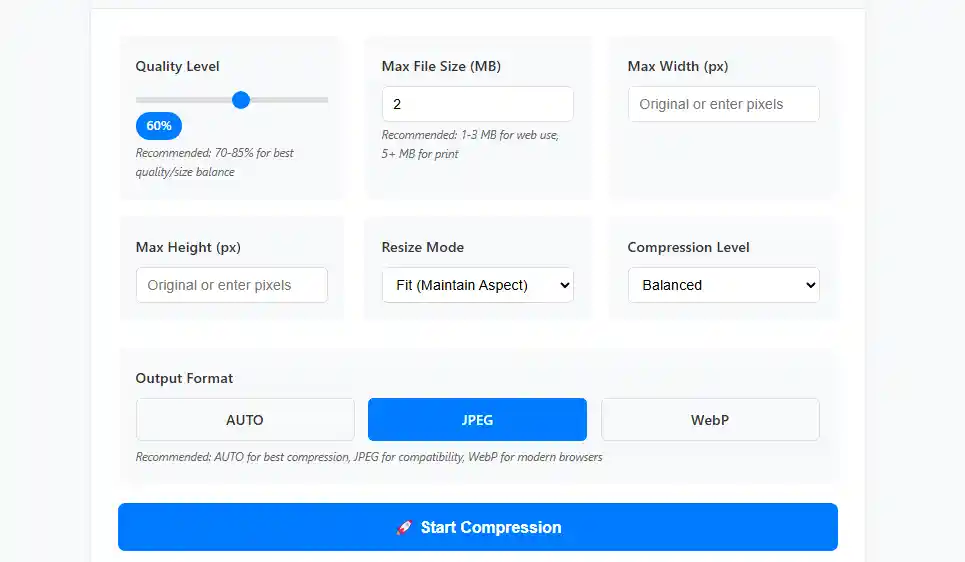
1. Output Format (Auto, JPEG, WebP, AVIF)
Choose the output image format for your compressed files:
- AUTO – Let the AI smartly select the most efficient image format.
- JPEG – Best for standard web use with great quality and compatibility.
- WebP – Ideal for faster websites and smaller file sizes.
- AVIF – Delivers advanced image compression with superior quality.
PNG format is excluded to ensure better compression results.
2. Image Quality Level (Recommended: 70–85%)
Set the image quality slider between 10% to 100%.
- Default is 80%, recommended range is 70% to 85% for best size-to-quality balance.
This ensures your compressed images remain visually sharp while significantly smaller in size.
3. Max File Size (MB)
Define the maximum image file size in megabytes:
- Default: 2 MB
- Recommended: 1–3 MB for websites, blogs, and email
- Use 5 MB or higher for print-quality images
This helps when compressing images for email attachments, fast-loading websites, or cloud storage.
4. Max Width & Height (px)
Resize your image by entering maximum width and height in pixels or select “Original” to maintain current dimensions.
This is useful when compressing images for mobile responsiveness or uniform gallery layout.
5. Resize Mode – Fit (Maintain Aspect Ratio)
Choose how the image should be resized:
- Fit (Maintain Aspect Ratio) – Ensures the image isn’t stretched or distorted during compression.
This mode is ideal for keeping visuals intact and optimized for all screen sizes.
6. Compression Level – Balanced
Pick a compression level to match your project goals:
- Balanced – Recommended setting that keeps both file size and quality well-balanced.
This is perfect for compressing images in bulk without the need to fine-tune each one.
By adjusting these options, you can reduce the size of multiple images using AI while maintaining full control over how they look and perform. The AI Bulk Image Compressor tool gives you flexibility and performance in one click—perfect for web developers, bloggers, students, marketers, and anyone looking to optimize images online.
Step 3: Click “Start Compression”
After adjusting all your preferred compression settings, simply click the “Start Compression” button to begin the process. This action activates the AI image compressor engine, which intelligently scans and processes each uploaded image based on the quality level, max file size, format, and dimensions you selected in Step 2.
The tool uses advanced AI compression algorithms to reduce image size while preserving visual clarity. Whether you're compressing images for a website, blog post, social media, or email, the compressor will optimize each file for fast loading and minimal storage use all within seconds.
As soon as the compression starts, you'll see a loading indicator showing real-time progress. This ensures a smooth user experience and confirms that the bulk image compression is actively running in your browser no need to upload files to a server.
Step 4: View Compression Preview
Once the AI has finished processing your images, you'll be able to preview the compressed results instantly. The tool generates a real time preview showing either a side by side comparison or detailed stats of each compressed image such as new file size, dimensions, and output format.
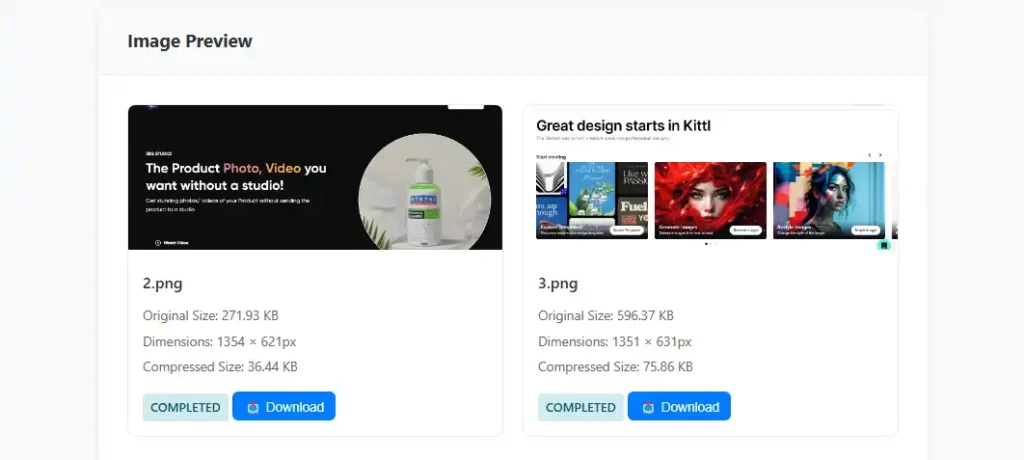
This step helps you visually confirm the impact of the AI compression before downloading. You can compare image quality and ensure your settings delivered the expected results especially if you're compressing images for websites, email attachments, or digital portfolios.
The preview appears right below the “Start Compression” button, keeping everything in one flow without reloading the page. Whether you're using JPEG, WebP, or AVIF, you can instantly see how much space was saved while maintaining sharpness and clarity.
Step 5: Review Compression Statistics
After previewing your optimized images, scroll down to the compression statistics section to review detailed insights about the performance of the compression process. This includes important metrics like:
- Original file size vs. compressed size
- Compression ratio
- Percentage of size reduction
- Total number of images processed
- Output formats applied (JPEG, WebP, AVIF)
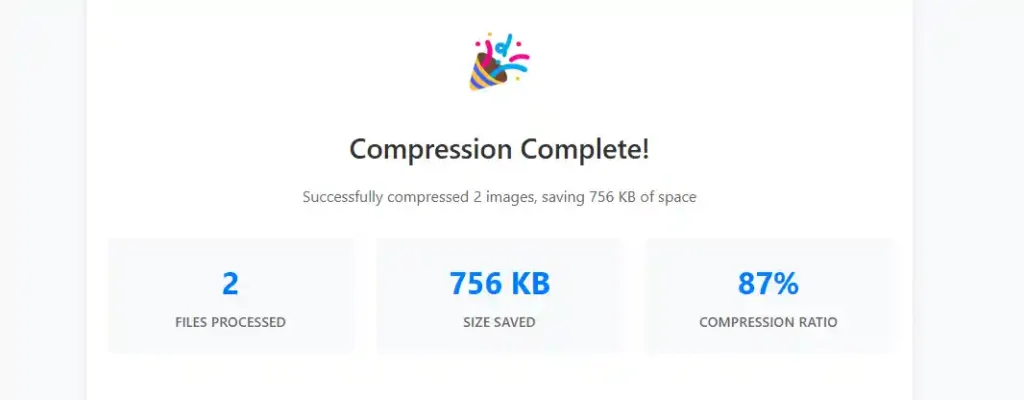
These stats give you a clear view of how efficiently the AI bulk image compressor has optimized your files. Whether you're reducing file size for faster page loads, SEO performance, or storage savings, this data helps confirm that your compression settings were effective.
The compression summary is especially useful for web developers, bloggers, marketers, and students who want to track performance improvements and ensure their images are fully optimized for online use.
Step 6: Download or Compress More
Once your images are fully compressed and you're satisfied with the results, it’s time to download your optimized images. You can either:
- Click “Download All” to instantly download a ZIP file containing all compressed images, or
- Download individually if you prefer to save selected images one by one.
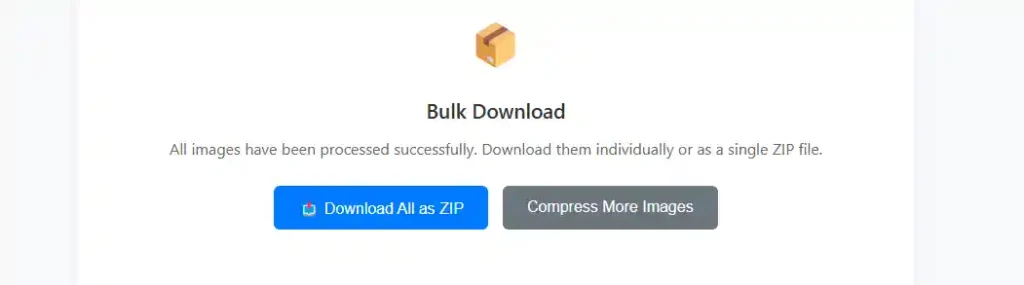
This final step ensures you get full access to your optimized assets in the most convenient way possible. Whether you're preparing content for your website, email campaigns, or cloud storage, this tool makes bulk image downloading fast and efficient.
Need to compress another batch? Simply click the “Compress More” button to restart the process no page reload, no hassle. The tool is designed for unlimited use, so you can continue compressing as many images as you need.
Key Features and Benefits of the AI Image Compressor Tool
The AI Image Compressor is built to make image optimization effortless for everyone from bloggers and marketers to developers and designers. This free image compressor allows you to images compress online in seconds, directly in your browser, with full control over format, quality, size, and dimensions. Below are the core benefits that make it the best image compressor for websites and online platforms.
1. Compress Multiple Images with One Click
Using our bulk image compression tool, you can upload and compress multiple images at once. Whether you're working on a website, blog, or eCommerce platform, the tool efficiently handles large batches. It supports compress JPG, WebP, and AVIF formats for complete flexibility.
2. Smart Image Optimizer for Quality Retention
This smart image optimizer is designed to compress photos without losing quality. It maintains image clarity by automatically calculating the best compression quality settings for each file. You can easily reduce image file size while keeping the content visually sharp.
3. Full Compression Control & Resizing Options
Customize how you compress images with detailed controls. You can resize images for email, set file size limits, adjust resolution, or use it as a responsive image resizer for mobile layouts. This ensures you're optimizing visuals for both speed and layout consistency.
4. In Browser Compression with Data Security
This in browser image compressor runs entirely on your device there’s no upload to external servers. It’s a privacy friendly image compression tool, perfect for professionals who need secure image optimization and prefer tools that don’t compromise data safety.
5. Optimize for SEO and Web Performance
Improve your site’s performance by reducing load times with image optimization for SEO. The tool helps you meet Core Web Vitals benchmarks by minimizing image size, making it an excellent image optimizer for blogs, Shopify stores, and WordPress sites.
6. Instant Preview and Download Options
Once compressed, you’ll get an instant image preview with side by side comparisons and image compression ratio data. Easily download compressed images in one click, or start over with the one click image compressor for unlimited use.
Why Choose This Free Online Image Compressor Tool?
If you're looking for a fast, secure, and efficient way to reduce image size, this tool offers everything you need. Here are the top reasons why thousands choose this free online image compressor every day:
1. Compress Images Online Without Losing Quality
This tool uses advanced AI to compress image online while maintaining their visual sharpness. Whether you’re preparing visuals for a website, email, or social post, it ensures you reduce image file size without losing quality.
2. Best Free Image Compressor for Websites and Blogs
Optimizing images is critical for speed and SEO. This is the best free image compressor for websites, blogs, and landing pages. It significantly reduces load time while improving user experience and Google performance.
3. Bulk Image Compression Without Losing Quality
Unlike many online tools that compromise visual clarity or require uploading files to external servers, this AI powered solution performs bulk image compression without losing quality directly in your browser. It maintains the original sharpness and detail of each image while reducing file size, ensuring your visuals remain high quality, secure, and ready for web, email, or storage.
4. Supports JPG, WebP, AVIF – Auto Format Optimization
You can compress and convert your images to modern web formats. Whether you want to compress JPG, WebP, or AVIF, the tool supports all major formats and even lets AI pick the best one automatically.
5. One-Click Download and Unlimited Use
This tool allows you to compress multiple images and download compressed images instantly with no limits or sign-ups. It’s the ultimate solution for repeat use and high-efficiency workflows.
FAQs About Free Bulk Image Compressor Online
What is the best AI image compressor tool online?
The AI Bulk Image Compressor is one of the best Free AI image compression tools available online. It allows you to compress multiple images at once without losing quality, directly in your browser. With smart compression algorithms, support for JPEG, WebP, and AVIF formats, customizable settings, and real-time previews, it delivers fast, secure, and high-quality results without watermarks, sign up.
How to compress multiple images at once without losing quality?
You can compress multiple images without losing quality by using an AI powered image compressor. It applies smart compression techniques to reduce file size while preserving image clarity, resolution, and format—no distortion, no data loss. Just upload, set your quality preferences, and download optimized images instantly.
How to compress images?
With this AI Bulk Image Compressor, compressing images is fast and effortless. Simply upload your images using the drag-and-drop feature, adjust your preferred settings like output format, quality level, and max file size, then click “Start Compression.” The tool uses AI to reduce file size without losing quality—completely in your browser, with no sign-up or installation required.
How to compress JPG, PNG images?
Using this AI Bulk Image Compressor, you can easily compress JPG and PNG images by uploading them directly into the tool. Once uploaded, choose your desired output format (like JPEG, WebP, or AVIF), set the quality level, and click “Start Compression.” The tool intelligently reduces file size while keeping your images sharp and clear all within your browser.
How to reduce size from MBs to KBs?
Using this Bulk Image Compressor, upload your image, choose a lighter format like WebP or AVIF, lower the quality level, and set a max file size in KB. The AI compresses the image instantly in your browser, reducing size from MBs to KBs without losing visual quality.
How to make all images smaller than 512x512?
With this AI Image Compressor, you can resize all images to fit within 512x512 pixels. Just upload your images, enter 512 for both max width and height, select “Fit (Maintain Aspect)” as the resize mode, and start compression. The tool will automatically adjust each image's size while keeping proportions intact.
How to do lossless compression?
To perform lossless compression with this AI Bulk Image Compressor, upload your images and set the quality level to 100%. Choose WebP or AVIF as the output format, which support efficient compression without reducing image quality. The tool optimizes file size while preserving every pixel perfect for maintaining full visual fidelity.
What’s the easiest way to compress a bunch of images at once?
The easiest way is to use the AI Bulk Image Compressor, which lets you upload and compress multiple images instantly. You can drag and drop your files, set the quality, size, and format, and download everything at once—no sign-up or software needed.
How can I shrink image file size without making it blurry?
With my AI Image Compressor tool, you can reduce image file size while keeping it clear by choosing the right format (like WebP), setting the quality to around 80%, and using balanced compression. The tool uses smart algorithms to avoid blurriness or pixelation.
What is the best image format to reduce size but keep quality?
WebP and AVIF are the best formats for smaller size with high quality. Our tool allows you to convert and compress images into these formats, making them perfect for fast-loading websites, social media, and SEO optimization.
Can I compress images for my website without losing SEO value?
Yes! Compressing images with this tool helps improve page speed, which is a core SEO factor. It keeps the image alt text, resolution options, and clarity intact—so your images remain crawlable, visible, and optimized for both users and search engines.
Is there a way to resize and compress images at the same time?
Absolutely. Just enter your target dimensions (e.g., 1024x1024) in the max width and height fields, and the tool will resize and compress each image in one step. Perfect for product photos, thumbnails, blog graphics, or app assets.
Conclusion: Optimize Your Images with the Best Free AI Image Compressor Tool
If you're looking to compress images online quickly, safely, and without losing quality, the AI Bulk Image Compressor is the best free solution available. Whether you need to compress JPG, WebP, or AVIF images, reduce file sizes from MBs to KBs, or perform bulk image compression for a website, blog, or email campaign, this tool offers unmatched performance.
With smart features like lossless image compression, responsive resizing, one click downloads, and secure browser-based processing, it's ideal for anyone who wants to optimize images for SEO, speed up page load times, and save storage space. Compressing images not only saves storage it directly improves your website’s speed and SEO rankings. Google PageSpeed Insights recommends image optimization as a key factor in performance audits.
No software installation, no login, and no limits just a powerful, AI powered image optimizer you can trust. Try the best free image compressor for websites today that allow you to reduce image size tool and see the difference in speed, quality, and efficiency.
Related Articles:
Best AI Image Generators
Best AI Avatar Generators
How to Create Realistic AI Avatars